Lesson Management. Simplified.
LessonMindr is the booking app built for independent lesson professionals. Set your hours, list your services, and take bookings from anywhere — all from your phone.
$9.99/month · Cancel anytime
Features
Everything a teaching pro needs
Built for the realities of running lessons day to day.
Daily schedule at a glance
Color-coded slots show what's open, what's booked, and what you've blocked off. No dialogs to dig through.
One-time or recurring weekly lessons
Set a regular student up for the whole term in one tap. Pick the days, choose an end date, you're done.
Block your personal time
Lunch breaks, travel, prep. Create one-time or recurring time reservations and they vanish from your public availability.
Travel-proof timezones
Detects when your phone's timezone drifts and asks once if you want to update. Lessons stay anchored to the right local time.
Working hours that fit your life
Set start and end times for each weekday separately, or apply one preset to the whole week. Days off vanish from the booking grid completely.
Up and running in 60 seconds
No setup wizard. Two screens, you're booking.
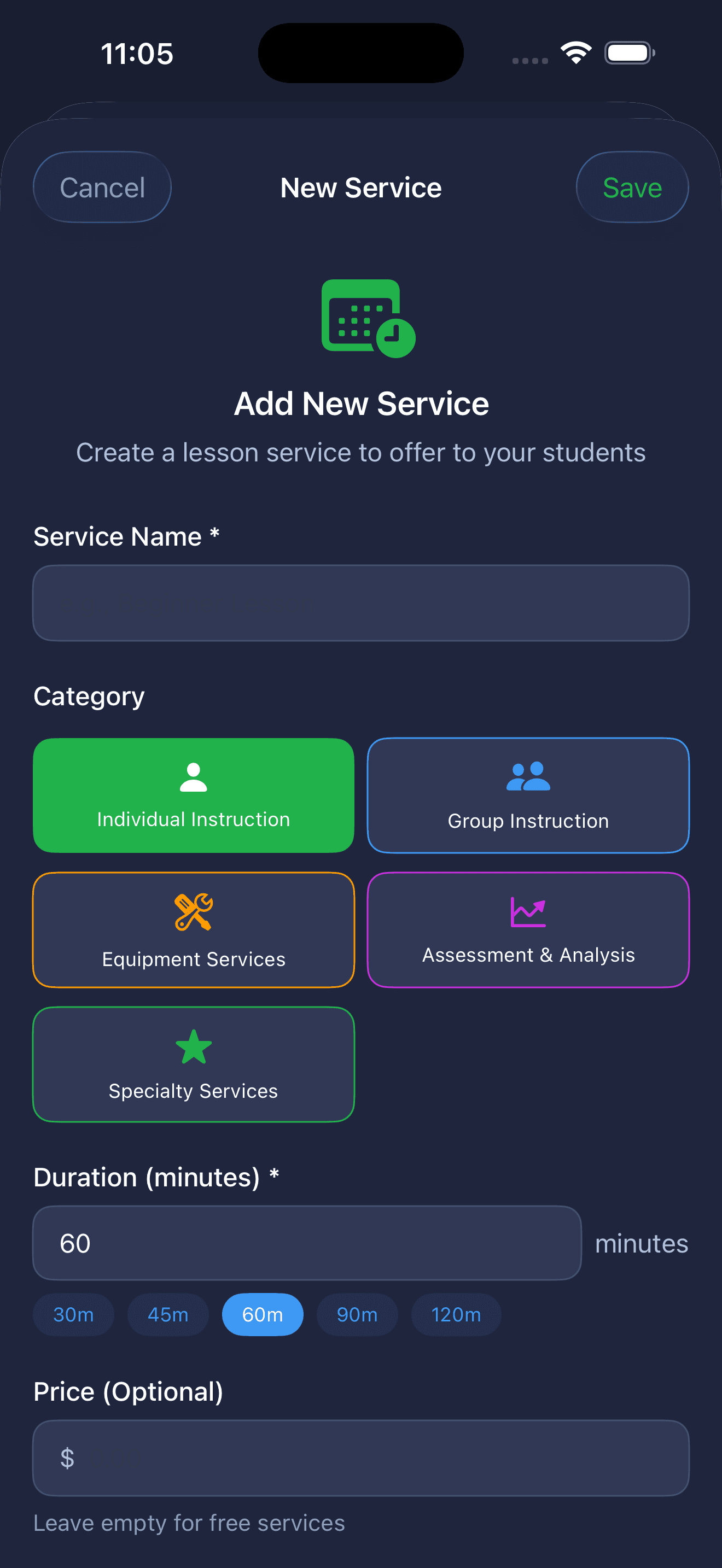
LessonMindr asks you for two things on first launch: what kinds of lessons you offer, and where you teach them. That's it — you're ready to take bookings.
Categorize how you teach
Individual Instruction, Group Instruction, Equipment Services, Assessment & Analysis, Specialty Services. Pick the category that fits, then set the duration and price.
Skip what you don't need
No team setup. No student import. No calendar sync to configure. The app is designed for one independent professional working from one phone.
Edit anything later
Add a new lesson type next month, raise your rates, retire a service. Everything you set up stays editable.
Teach anywhere
Every location. Every booking. Tied together.
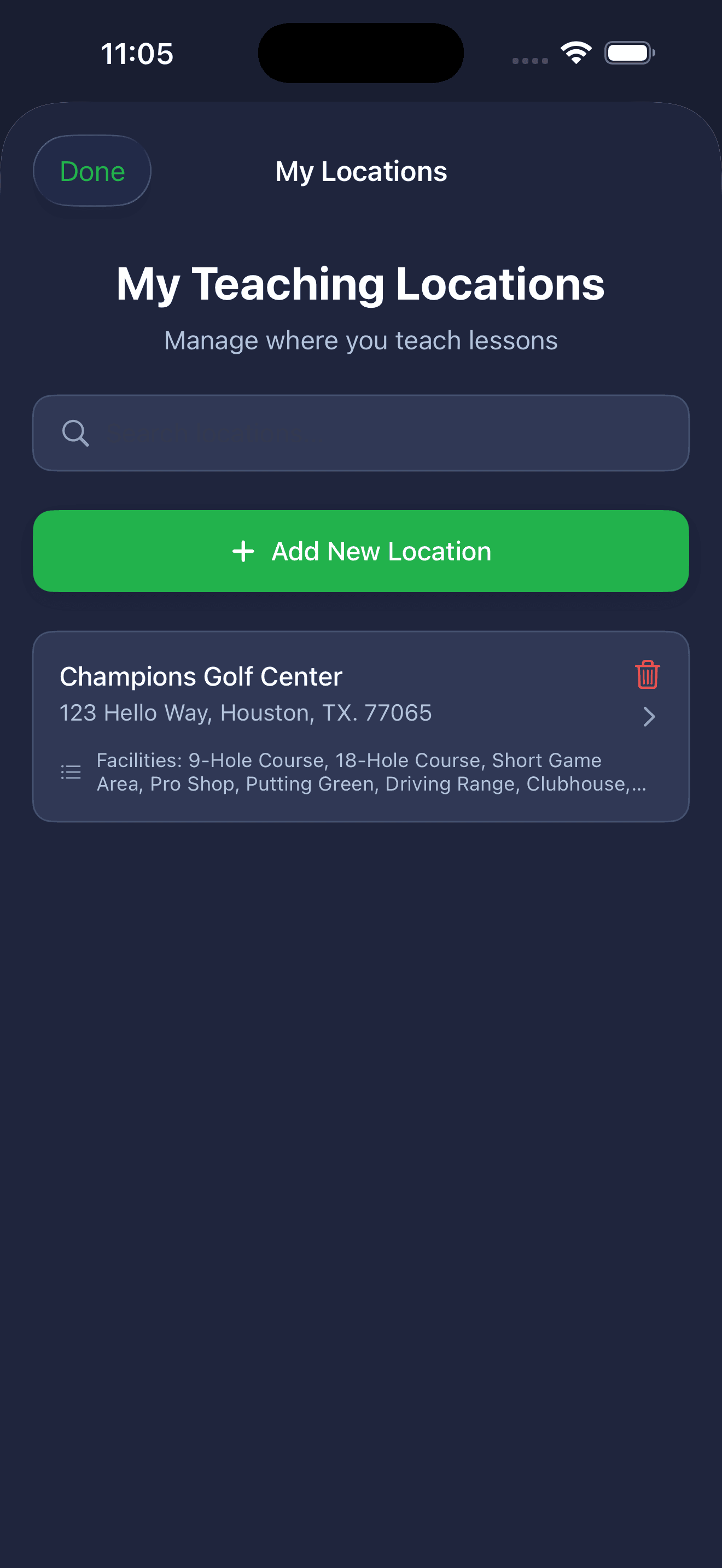
Independent pros rarely teach in just one place. LessonMindr lets you add as many teaching locations as you want — your home studio, a client's space, a partner venue, a rented room — and tags every lesson with the right place.
Address + phone, ready to share
Each location stores its full address and contact info. When you book a lesson, the student's confirmation email pulls the venue details automatically.
Tag what's on site
Note the rooms, equipment, or facilities each venue offers so you remember what you can teach there. Useful when you teach different services at different locations.
Filter your day by venue
Working out of two locations this week? See exactly which lessons are at each one without sorting by hand.
Your week, your way
Set your weekly availability once.
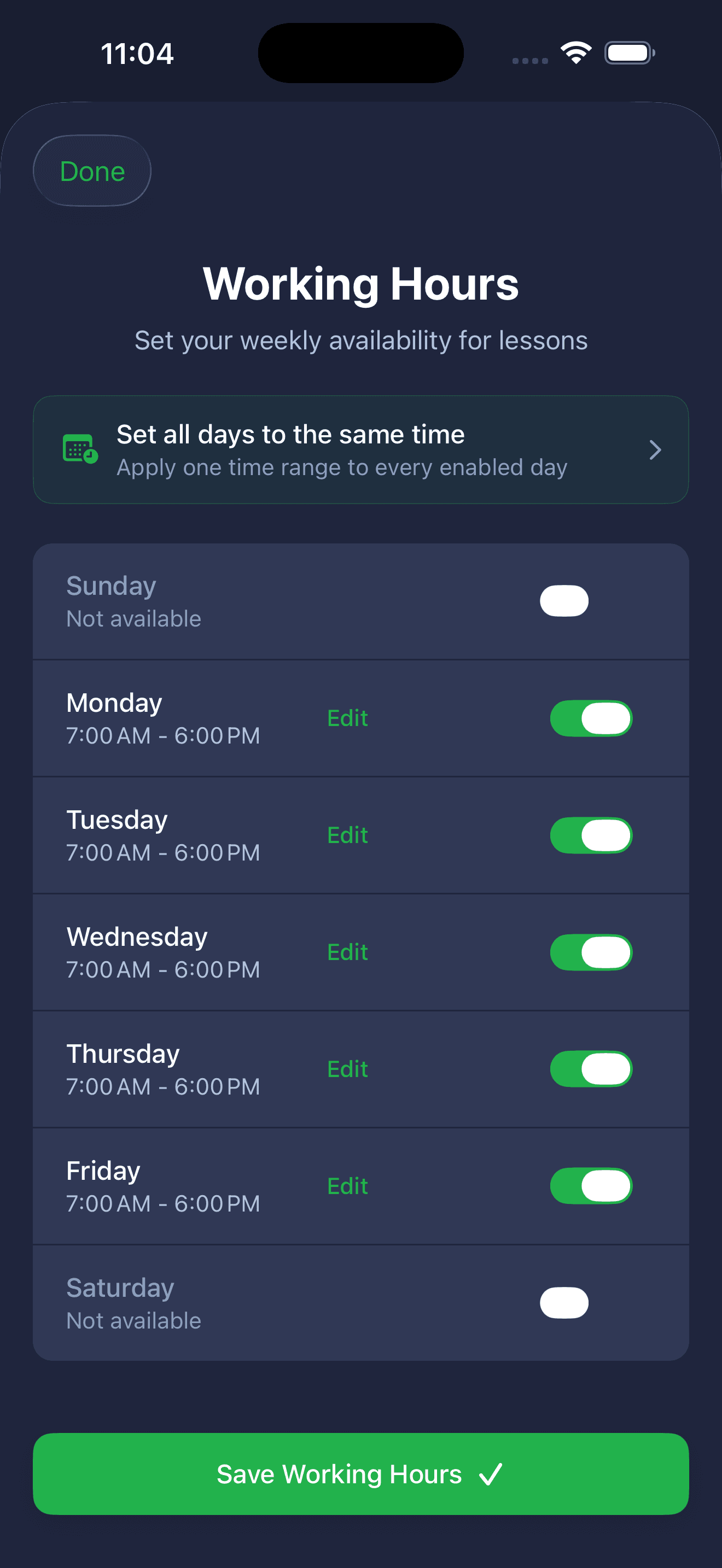
Tell LessonMindr when you're available to teach. Each day has its own start and end time, and you can toggle any day off entirely. Days that are off vanish from the booking grid completely — students browsing your availability never see a slot that doesn't exist.
Per-day, not one-size-fits-all
Teach 7-6 on weekdays but 9-2 on Saturdays? Toggle Sunday off entirely? Each day is independent. Edit any day inline, save once.
Bulk apply when you want it
The "Set all days to the same time" shortcut at the top applies one time range to every enabled day at once. Useful when your week is uniform — skip it when it isn't.
Drives the booking grid directly
Whatever you save here defines which time slots appear as Available. Change your Friday hours and Friday's grid updates the next time you open it.
The breaks you need
Block the time that's not for teaching.
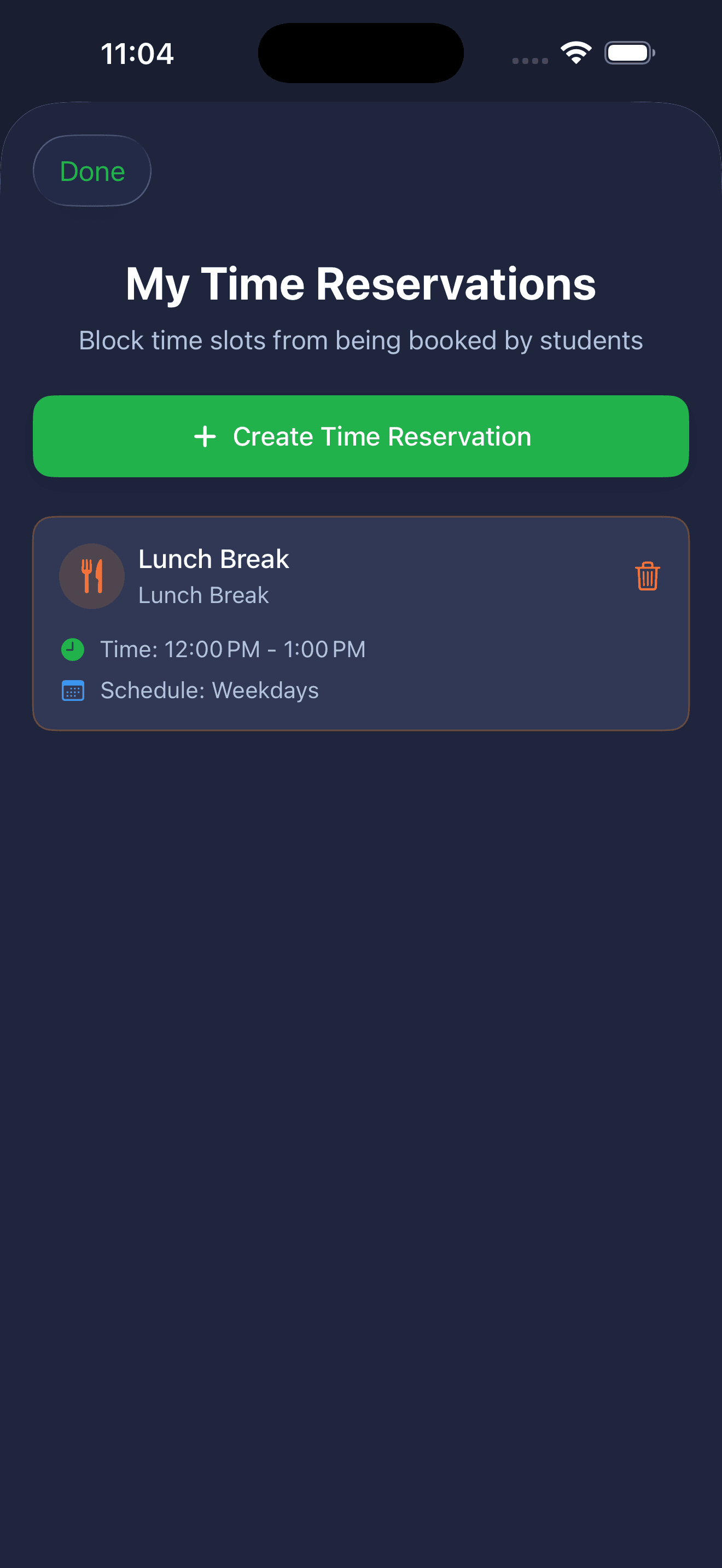
Lunch. Prep. Travel between locations. Quiet hours to plan next week's lessons. Time Reservations let you carve out chunks of your day that won't show up as bookable — even if they fall inside your working hours.
One-time or recurring
Set a one-off block (this Thursday only, 2-4 PM) or a recurring one (every weekday, 12-1 PM for lunch). Recurring blocks repeat automatically until you remove them.
Categorize what's blocked
Each reservation gets a label — Lunch Break, Travel, Prep, Personal Time — so when you look back at your week, you can see exactly where your day went.
Disappears from the booking grid instantly
Add a reservation and the matching slots vanish from your Available list. No double-bookings, no "oh, sorry, I have lunch then" rescheduling.
Your day at a glance
Every open slot. Right on the day.
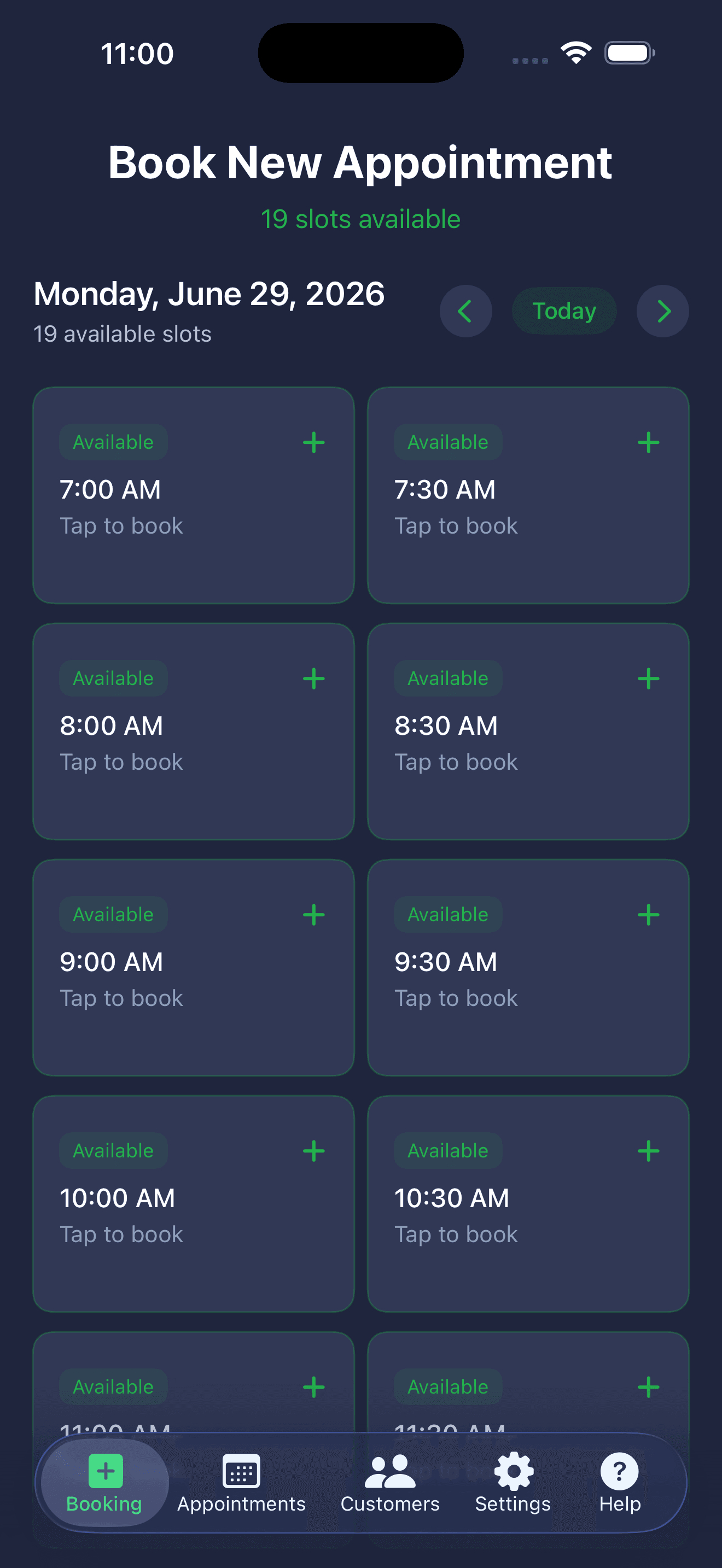
Open the Booking tab and you see your day broken into bookable slots, each color-coded for whether it's open, taken, or blocked. Tap any green Available card to start a booking. The grid respects your working hours, your time reservations, and your already-booked appointments — so the only times you see are the ones a student could actually take.
Available slots, front and center
Green cards mean tap-to-book. The count above the grid tells you how many slots are open for the day, so you know your capacity at a glance.
Jump between days fast
Back and forward chevrons step through dates one day at a time. Tap Today to snap back to today no matter where you've drifted.
Only the times that exist
Slots before your working hours, after your working hours, during your time reservations, or already booked just don't appear. You can't accidentally book yourself into a conflict.
Booking that fits your day
One screen. Service, location, customer, done.
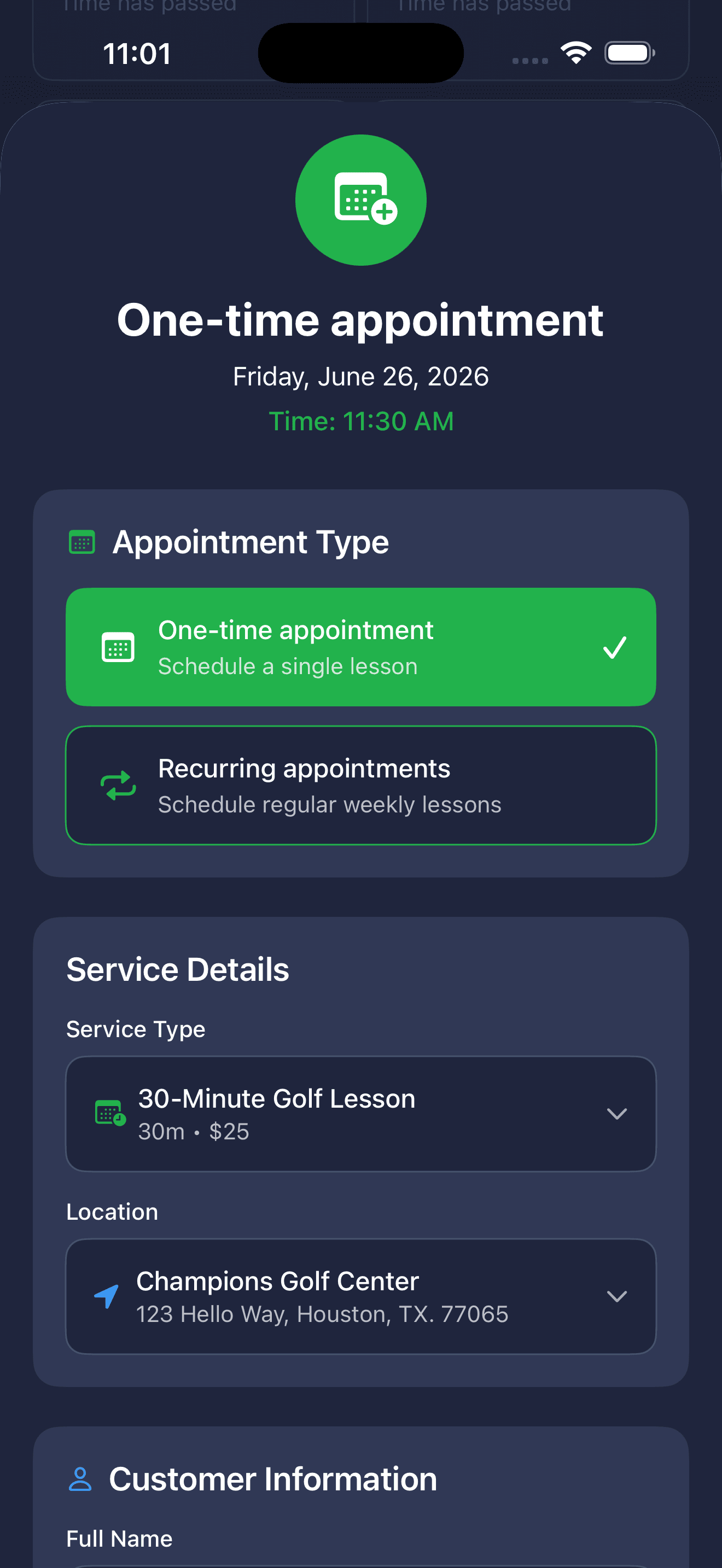
Tap any open slot. LessonMindr fills in the date and time, asks you who's coming, which service, which location — and sends the confirmation email when you save. The whole flow takes less than thirty seconds.
Student autocomplete
Start typing a name. Existing students show up instantly with their email and phone pre-filled. New student? Just type it in — they're added to your list automatically.
One-time or recurring
Flip a toggle to make it weekly. Pick the days the lesson repeats and an end date (one month, three months, six months, a year). LessonMindr creates the whole series in one save.
Email confirmations on by default
When you save, the student gets a clean confirmation email from hello@lessonmindr.com with the date, time, service, and location. Toggle off for walk-ins.
Working-hours aware
The slot picker only shows times inside your set hours. Days you've marked off don't appear. No double-bookings against blocked time.
LessonMindr buffers a 15-minute prep window before each lesson so you're never booked right up to the previous start time.
Stay on top of every lesson
Manage every appointment without leaving the app
Mark a no-show. Reschedule with one tap and the student gets notified. Cancel and the email goes out automatically. No spreadsheet, no follow-up dance.
Filter by what matters now
All / Today / Upcoming / Past, one tap from the menu at the top. Stop scrolling through last month's lessons to find tomorrow's.
Status changes that travel
Tap an appointment's status badge: Confirmed, Pending, Complete, No-Show, Cancelled. Cancelling sends an email to the student; marking complete or no-show updates your records silently.
Reschedule with one tap
Open the reschedule sheet, pick a new date and slot, and check the 'notify customer' toggle. They get an email with the new time. You're done.
Smart date labels
Today's lessons say 'Today.' Tomorrow's say 'Tomorrow.' Past lessons dim. Color cues mean you parse the list in a glance.
Call or email from the card
Phone icon dials. Mail icon opens a draft to your student. Their contact details are right there — no digging.
Pull to refresh
Quick gesture pulls the latest from your account. Useful when you've just made a change on another device.
Students
Your student list builds itself
No CRM imports. No spreadsheets to update. Book a lesson — the student's on your list. Book them again — LessonMindr knows their history.
Smart status tags
LessonMindr labels every student automatically
- Active
Booked in the last 30 days
- New
Two or fewer bookings ever
- Frequent
Five or more bookings
- Dormant
Last booking 31–90 days ago
- Inactive
No booking in 90+ days
Filter by status with one tap
Hamburger menu in the top corner. Pull up just the students who've gone dormant; send them a quick text.
See the lifetime value at a glance
Each student card shows total bookings, total lesson time, and bookings-per-month average. You know who your best students are without thinking about it.
Call or email in one tap
Tap the phone icon to dial. Tap the email icon to open your mail app with the To: field pre-filled. No copy-paste.
Search across everything
Type a name, an email fragment, or the last four of their phone number. Match shows up instantly.
Pricing
Simple, transparent pricing
One plan, full access to every feature. No hidden fees.
LessonMindr Pro
The full booking suite for independent lesson pros
- Unlimited bookings and appointments
- Set your own services & rates
- Manage multiple teaching locations
- Daily schedule at a glance
- Works offline when you're between venues
- Cancel anytime in the App Store
LessonMindr Pro is an auto-renewable subscription billed at $9.99/month through your Apple App Store account. Your subscription renews automatically each month until you cancel; cancel any time in iOS Settings → Apple ID → Subscriptions. Payment is charged to your Apple ID at confirmation of purchase.
FAQ
Common questions
Who is LessonMindr for?
Any independent lesson professional running their own bookings — music teachers, tutors, fitness coaches, sports coaches, language instructors, art teachers, golf pros, anyone teaching one-on-one or small groups from their phone.
Is LessonMindr only for iPhone?
Yes — LessonMindr is currently an iOS app for iPhone and iPad. Sign in once and your data syncs across both. Android support is on the roadmap.
How do I sign in?
With Google or Apple. Both create a secure account tied to your email. There's no separate password to remember.
Can I create recurring weekly lessons?
Yes — switch the booking form from one-time to recurring, pick which weekdays repeat (Sunday through Saturday), and set an end date. LessonMindr creates the whole series at once.
Can students book their own lessons?
Yes. Email a student a one-time booking link from the app. They open it, pick from your real open time slots, and confirm — the appointment lands on your calendar automatically. The link expires after 3 days and can be used once, so it stays secure.
How do students get notified about their lessons?
When you confirm a booking, reschedule, or cancel, the app emails the student automatically. On top of that, LessonMindr sends each student a reminder about a day before and again about an hour before their lesson — so they show up, and you don't have to chase anyone.
Can students reschedule or cancel their own lessons?
Yes. Every confirmation and reminder email includes a secure "Manage this lesson" link. From it, a student can move the lesson to another of your open slots or cancel it — but only outside the notice window you set (24 hours by default). Inside that window they're asked to contact you directly. You're emailed and notified in-app whenever a student reschedules or cancels, so nothing happens behind your back.
Does LessonMindr send lesson reminders?
Yes — automatically. Each student gets an email reminder roughly a day before and an hour before their lesson, and every reminder carries their link to reschedule or cancel if plans change. It runs on its own; there's nothing to set up.
Will I know when a student books on their own?
Yes. When a student books through a link or a payment comes in, you get an in-app notification with an unread badge — plus an email — so you always know about a new booking even if you weren't in the app at the time.
How does payment tracking work?
Each lesson can be marked Paid, Cash, or Free, and you can email a student an invoice with the amount due and your Venmo or Zelle details so they can pay you directly. LessonMindr keeps track of what's outstanding and what's collected — it doesn't process payments itself, so money goes straight to you with no processing fees.
What if my time zone changes when I travel?
LessonMindr detects the drift and asks once if you want to update your saved timezone. Existing lessons stay anchored to the local time you originally booked them at.
Can I block off personal time?
Yes. Add a time reservation — one-time or recurring — for lunch, travel, prep, or anything else. Reserved slots disappear from your bookable availability.
How does the customer list work?
Students are added automatically the first time you book them. LessonMindr tags each one as Active, New, Dormant, Inactive, or Frequent based on their booking history, so you can see who's worth a follow-up at a glance.
What's included in the $9.99/month?
Unlimited bookings, services, locations, and students. Recurring lessons. Student self-booking links plus self-serve reschedule and cancel. Automatic lesson reminders. Confirmation, reschedule, and cancellation emails to your students. Payment tracking with Venmo/Zelle invoices. Cross-device sync on iPhone and iPad. No upsells, no extras.
Can I cancel anytime?
Yes. Cancel from iOS Settings → Apple ID → Subscriptions at any time. You'll keep access until the end of your current billing period.
Is there a free trial?
Check the App Store for the current offer — we update it from time to time.
What if I cancel and come back later?
Your account, bookings, services, and students stay on our servers. Re-subscribe with the same Apple or Google sign-in and you'll pick up where you left off.